You may like a fan’s familiar hum while no longer wanting air blowing across the room. An audio option lets you choose the sound separately from the breeze. It does not provide a fan’s airflow or cooling.
Start with one background, not a stack of players. RainSleep offers a fan sound page and a published rain recording to try in turn. Quiet is also a valid choice.
The real question: the sound, or the moving air?
In a recent r/sleep discussion, a reader wanted the familiar noise after the weather cooled, without continuing to run a fan for the breeze. Replies suggested different sound options. Those experiences identify a practical question; they do not prove that any sound improves sleep.
Ask which part you actually want. If it is the steady hum, try audio. If you need airflow or a different room temperature, a sound player cannot supply that. You do not have to replace your fan with rain just because both are background sounds.
Two options, with different sound textures
| Option | What you are choosing | What to notice |
|---|---|---|
| Fan sound player | A fan-like sound generated in the browser; choose among four presets | Whether the hum feels comfortable or keeps attracting attention |
| One rain recording | A published recording with its own rain texture and duration | Whether you enjoy the drops or keep listening for the next change |
| Quiet | No added sound | Whether the room already feels comfortable without another layer |
This is a choice of listening atmosphere, not a ranking of sleep aids. A phone speaker, an external speaker and different room positions can make the same option sound different. Our speaker and headphones guide covers output choices separately.
Try the fan player first, then pause to compare
- Clear the other sound. If the rain control beneath this article’s title is playing, select “Stop”. That article background is rain, not the fan demonstration. Avoid overlapping it with the next player.
- Choose one fan preset. Open the fan player, begin with “Box Fan”, then select “Play Box Fan”. Use a low, comfortable volume. Other choices are “Desk Fan”, “Air Conditioner” and “Deep Fan”; the “Air Conditioner” label names a sound preset, not temperature control. Try one at a time rather than repeatedly changing the output volume.
- Stop before trying rain. Select “Stop” on the fan player. Open the rain recording, use “Play”, and use “Pause” when you want to stop that comparison. Listen during a short, ordinary wind-down period; there is no required number of minutes or volume percentage.
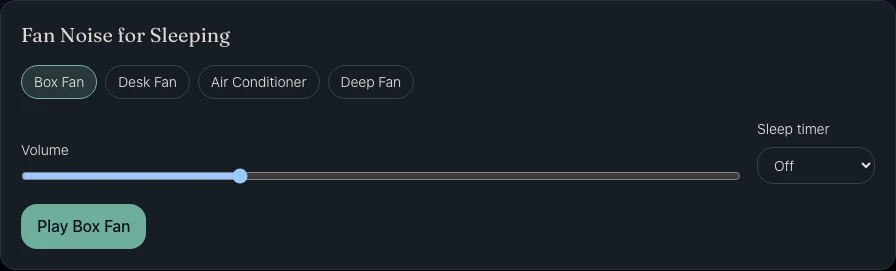
Actual RainSleep screenshot, shown in English. Open the linked player for your language’s controls; the pictured slider position is not a recommended listening level.
Keep the option you can comfortably leave alone
| What happens | A reasonable next move |
|---|---|
| You like the hum and stop adjusting it | Keep that single preset for now |
| The hum feels too prominent | Lower it, try a different preset, or return to quiet |
| You prefer the rain texture | Use one rain recording rather than layering it over the fan |
| Someone sharing the room dislikes the sound | Agree on a quieter level, a different setup, or no added sound |
| Neither option feels pleasant | Stop the audio; there is no need to keep searching tonight |
These are personal observations, not an experiment or a measure of sleep quality. Different evenings and devices can change your preference. RainSleep adds audio; it does not remove the original room noise or guarantee a sleep result.
AI-generated setup illustration: choose one sound at a comfortable level and leave the screen aside.
Set a timer deliberately and keep playback limits in mind
The fan page’s “Sleep timer” offers “Off”, 15, 30, 60 and 90 minutes. Choose it before starting if you only want a limited session. “Off” means no timer is selected; it is not a promise of uninterrupted playback all night.
Keep the fan page open while using it. Browser policies, device power management and connectivity can affect web playback, so this guide does not certify screen-off, locked-phone or overnight operation. The rain comes from a finite recording that the player can restart. Reaching the audio file’s boundary is not the same as the sleep timer expiring. See rain playback troubleshooting if audio ends unexpectedly.
If you choose rain but find sudden thunder distracting, the gentle-rain and thunder comparison can help you choose what to audition next. You can also stop without replacing the sound.
Sources and scope
The r/sleep question supplied the real sound-without-breeze problem. SleepByNoise’s fan page and NSDR’s fan page informed the separation of sound, controls and practical questions; calm.org.uk’s ambient-sound guide informed the simple, optional listening approach. Their player features and scientific claims are not claims about RainSleep. Product steps and the screenshot were checked against RainSleep; no personal sleep test or benefit is claimed.