If you stop one rain player and still hear sound, find the source before rebuilding your mix. A real Reddit question asks how to locate audio among many tabs. The same check is useful when you have RainSleep open alongside other pages.
The small player beneath this title is one possible source. Stop it while you follow the check below.
Stop this page first
Use “Stop” beneath the title. The control should offer “Play” afterward. Listen again before changing the device volume. Do not assume that a control in one tab has stopped audio in every other tab or app.
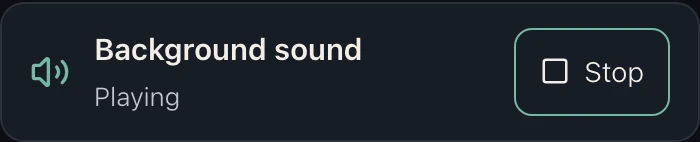
Actual control from an existing RainSleep article in English, shown during playback.
Find another playing tab
Chrome on computers: the toolbar media control can return you to a playing tab. Safari on Mac: hold the address-bar audio button to list playing websites.
Use the list to open the source page, then its own pause or stop control. If no useful entry appears, check other browser windows and apps. Browser layouts and supported media controls vary; the steps here concern desktop browsers.
Muting is different from stopping
| Action | What to check |
|---|---|
| Mute a tab or site in the browser | Output is silenced; playback may continue. Silence alone does not confirm it stopped. |
| Use the page’s stop or pause control | Check that the player has stopped, not merely that its volume is low. |
| Close an unneeded tab | That page is closed; check any other sources separately. |
If you muted a tab or site, unmute it when you intentionally want to listen again. A running but muted player can otherwise look like a playback fault.
Check one source at a time
- Stop this article’s player and leave it stopped.
- Find another audio source, open that page and stop its player. Repeat for any other playing pages.
- With those sources stopped, listen again. If sound remains, check another app or a physical sound source before changing a saved mix.
Keep one intentional rain tab
When you are ready, open Gentle Rain for Relaxation in one tab and start it deliberately at a comfortable level. For several RainSleep sounds together, use the Mixer and its mixing guide, rather than relying on separate pages to stay coordinated.
AI scene illustration: choose one listening source and use its actual player controls.
If your problem is the opposite—the chosen rain stops unexpectedly—use the interruption checklist. Finding an unwanted source and diagnosing an interrupted player are different tasks.
Sources and scope
MDN documents muting and pausing as separate media operations. MacWorks’ guide illustrates visible browser audio controls. This article uses RainSleep’s current title-below controls; it does not promise browser-wide stopping or phone, lock-screen or overnight behavior. The scene images are illustrations, not screenshots; the narrow control image is an actual RainSleep capture.