If you want only rain, start with a rain track you can hear now. If you want piano or sustained musical tones inspired by a rainy evening, start with a music brief. The word “ambience” can mean either, so decide what should actually be audible before you write a prompt.
The player below this title uses an existing rain track available on RainSleep. It is not a demonstration of generated music.
Why “rain ambience, no music” can go wrong
In a real Reddit discussion, a creator wanted environmental sounds, including wind and rain, without instruments. They reported drums overwhelming those sounds despite their prompt. That is one person’s account, not a controlled test or a claim about every music generator.
RainSleep’s Generator guide makes a useful distinction: AI Music creates music from a description; it is not a dedicated pure-rain sound-effect generator. Adding a longer list of forbidden instruments does not change the kind of tool you are using.
Choose the output before the prompt
| What you want to hear | Where to start | What to check |
|---|---|---|
| Rain without a musical arrangement | An existing track on Rain Sounds | Preview the actual audio rather than assuming from the title. |
| Rain-inspired instrumental music | AI Music in the Studio | Describe instruments, phrasing and energy; judge the returned audio. |
| Spoken relaxation or a story | Sleep Content in the Generator | This mode produces narration without mixed background music. |
These are different starting points, not interchangeable names for the same output. RainSleep’s ready-to-play library and free Mixer are separate from generation, which requires sign-in and credits.
For only rain, listen first
Open Gentle Rain for Relaxation, the existing track selected for this article’s player. Listen at a low, comfortable level and decide whether its texture fits what you need. If you want to combine existing sounds, use the Mixer; that combines available tracks rather than generating a new rain effect from text.
AI-generated scene illustration: for ready-to-play rain, choose an existing track and preview it.
For music, describe the musical result
“Rainy evening ambience” leaves a lot unspecified. A more useful music brief names the sounds you do want, then the pace, energy and changes you would prefer. Here is an original starting example:
Quiet instrumental music for a rainy evening: sparse soft piano, warm sustained pads, slow unhurried phrasing, low energy, and gentle transitions. No vocals, percussion, or dramatic build.
This is an unsubmitted prompt example, not a tested result. The rainy evening describes the atmosphere; it does not promise a separate layer of rain sound. The exclusions express a preference, not a guarantee that every unwanted sound will be absent.
Prepare the brief in Studio
- Open RainSleep Studio and choose “AI Music”. Put your brief in “Describe Your Soundscape”.
- Open “Advanced settings” and check “Instrumental (no vocals)” if you want instrumental music. This setting concerns vocals; it does not turn music generation into pure rain generation.
- Before submitting, check your sign-in state and credit balance. A generation request uses one credit and may return up to two music versions. If you decide to generate, listen to the actual result and change one relevant part of the brief before another request.
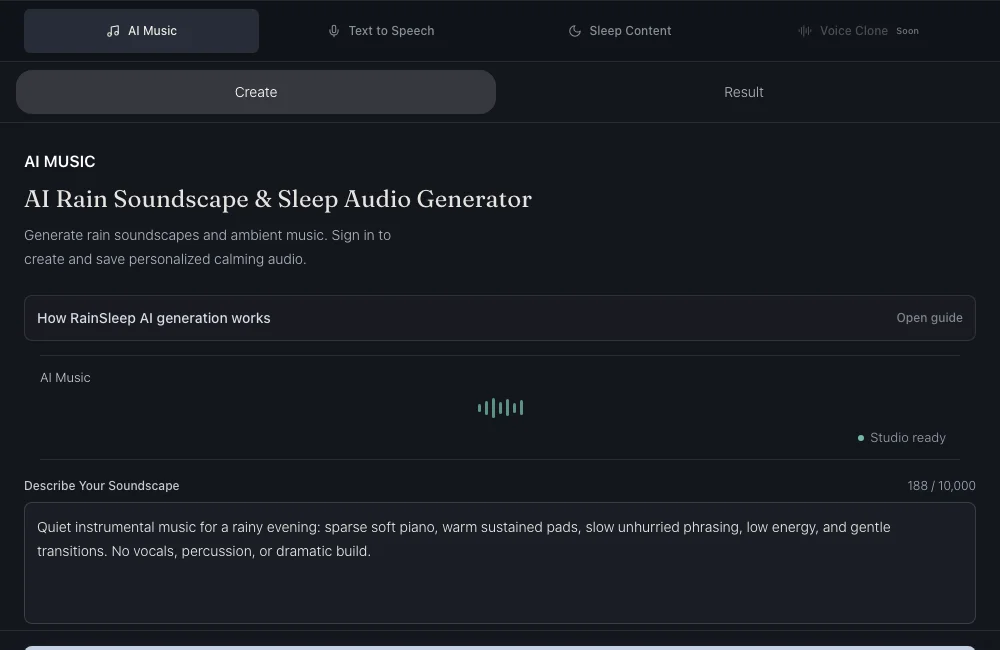
Actual RainSleep Studio in English. The example is entered for illustration; no generation was submitted.
If a musical result keeps attracting attention, returning to an existing rain track is a valid choice. You do not need to spend generation credits to use the ready-to-play rain library.
Sources and limits
Adobe’s sound-effects guide distinguishes sound effects and ambience from music or speech. ElevenLabs’ prompting help separates a simple sound brief from a complex sequence. Saturalabs’ guide starts with choosing a method. Their tools have their own capabilities; those capabilities do not carry over to RainSleep.
The steps here follow RainSleep’s current public guide and visible Studio controls. They promise no exact audio outcome, sleep benefit or fixed completion time. The scene images are independent AI illustrations; the Studio image is a real interface capture.